
TL;DR — Cloud migration is far more than moving servers into the cloud. Gartner reports that 85% of enterprises will adopt a cloud-first strategy by 2025, yet McKinsey research shows 38% of migration projects exceed their budgets. This guide delivers a complete seven-step migration process, a four-strategy comparison table, a pre-migration assessment checklist, and proven strategies for avoiding the most common pitfalls — so you can migrate with minimum risk and maximum efficiency.
Introduction
Cloud migration has shifted from a question of “should we do it” to “how do we do it right.”
According to Gartner’s 2024 report, 85% of enterprises will have adopted a cloud-first strategy by 2025. But the reality of cloud migration is far more complex than it appears — McKinsey research found that 38% of cloud migration projects exceed their original budgets, while Flexera’s 2024 State of the Cloud Report revealed that organizations waste an average of 28% of their cloud spend.
The problem is not that cloud technology is unreliable. It is that too many organizations rush into migration without a systematic plan, resulting in either cost overruns or performance that falls short of expectations.
This guide walks you through every step of the cloud migration journey, from initial assessment to ongoing optimization. Whether you are a mid-size business moving to the cloud for the first time or a large enterprise migrating core systems from on-premises infrastructure, you will find an actionable methodology here. If you are still evaluating your overall cloud architecture direction, we recommend starting with our Complete Guide to Enterprise Cloud Architecture and Partner Selection to build a strategic perspective first.
Pre-Migration Assessment Checklist
A successful cloud migration starts with thorough upfront assessment — skipping this step is the root cause of most migration failures.
According to IDC research, organizations that perform a thorough pre-migration assessment are 2.5 times more likely to complete their projects on schedule. Here are the four assessment dimensions you must address before migrating:
Workload Assessment
- Application inventory: List all applications to be migrated, including their versions, dependencies, and data volumes
- Dependency mapping: Diagram the call relationships between applications and identify tightly coupled systems
- Resource utilization analysis: Record each application’s CPU, memory, storage, and network consumption patterns
- User scale: Daily active users and peak traffic volumes for each system
TCO (Total Cost of Ownership) Analysis
| Cost Item | On-Premises | Cloud |
|---|---|---|
| Hardware costs | Server, storage, and networking equipment purchases | None (pay-as-you-go) |
| Operations staff | Dedicated infrastructure engineers required | Can be significantly reduced |
| Power and cooling | Data center operating costs | None |
| Software licensing | OS, database licenses | May convert to cloud-based licensing |
| Scaling costs | Upfront procurement required (often over-provisioned) | Scale on demand |
| Disaster recovery | Must build a separate DR site | Built-in multi-AZ architecture |
Compliance Requirements
- Does data residency comply with relevant regulations (GDPR, CCPA, local data protection laws)?
- Are there industry-specific restrictions on cloud adoption (financial services, healthcare)?
- Will existing security certifications (ISO 27001, SOC 2) need to be recertified after migration?
Team Readiness Assessment
- Does your team have cloud skills? How large is the gap?
- Do you need to bring in an external partner to support the migration?
- How long and how much budget will training require?
Four Cloud Migration Strategies
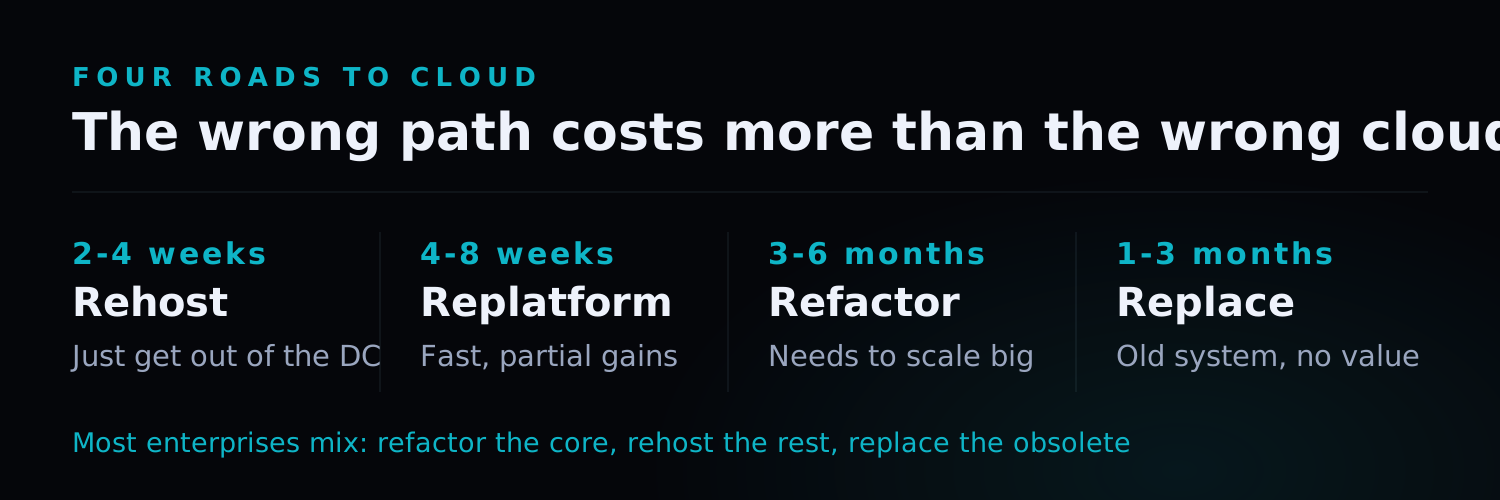
McKinsey reports that 38% of cloud migration projects exceed their budgets, often due to selecting the wrong migration strategy (McKinsey, 2024). Every migration strategy has its ideal use case — choosing the wrong strategy is more damaging than choosing the wrong cloud provider.
Strategy Comparison Table
| Dimension | Rehost (Lift & Shift) | Replatform (Lift & Reshape) | Refactor (Re-architect) | Replace |
|---|---|---|---|---|
| Description | Move to cloud VMs with zero changes | Make minor optimizations during migration | Re-architect for cloud-native | Replace with SaaS or new system |
| Cost | Low ($) | Low-Medium ($$) | High ($$$$) | Medium ($$$) |
| Timeline | 2–4 weeks | 4–8 weeks | 3–6 months | 1–3 months |
| Complexity | Low | Medium | High | Medium |
| Cloud benefit | Limited | Partial | Maximized | Depends on new system |
| Best for | Urgently leaving data centers, limited budgets | Quick partial cloud advantages | Major scalability and performance needs | Systems with no maintenance value left |
| Risk | Low — but may carry technical debt to cloud | Medium — change scope must be tightly controlled | High — essentially rebuilding | Medium — data migration must be handled carefully |
How to Choose a Migration Strategy
Use this decision matrix:
- Is the system still functional? If yes, consider Rehost or Replatform
- Do you need significantly better performance or scalability? If yes, consider Refactor
- Is there a mature alternative on the market? If yes, consider Replace
- Do you have sufficient budget and time? If not, prioritize Rehost and optimize incrementally later
The Seven-Step Cloud Migration Process
Gartner data shows that organizations using a structured migration methodology complete projects 2.5x faster than those using ad-hoc approaches (Gartner, 2024). The following seven-step methodology has been validated across 300+ projects. Each step has clearly defined inputs, activities, and outputs.
Step 1: Current State Assessment and Inventory
Goal: Build a complete information foundation for migration decisions.
- Use automated discovery tools (e.g., AWS Migration Hub, Azure Migrate) to scan your existing environment
- Create a full application inventory including tech stacks, dependencies, data volumes, and user counts
- Identify non-migratable systems (special hardware requirements, licensing restrictions, etc.)
- Categorize applications into “must migrate,” “can migrate,” and “defer” groups
Output: Application inventory report, dependency map, preliminary migration scope definition
Step 2: Migration Strategy Development
Goal: Select the optimal migration strategy for each application.
- Based on the inventory from Step 1, conduct a “6R Assessment” for each application (Rehost, Replatform, Refactor, Rebuild, Replace, Retire)
- Define migration priority — start with non-critical systems to build experience before tackling core systems
- Create a wave plan with 3–5 applications per wave
- Estimate staffing, timeline, and cost for each wave
Output: Migration strategy document, wave plan, cost budget
Step 3: Target Architecture Design
Goal: Design a cloud architecture that will support business growth for the next 3–5 years.
- Select your cloud provider and services (IaaS/PaaS/SaaS combination)
- Design the network architecture (VPC, subnets, security groups, VPN/Direct Connect)
- Plan compute, storage, and database services
- Design high availability and disaster recovery architecture
- Build Infrastructure as Code (IaC) templates
Output: Architecture design document, network topology diagram, IaC templates
Step 4: Security and Compliance Planning
Goal: Ensure post-migration systems meet security standards and regulatory requirements.
- Define Identity and Access Management (IAM) policies
- Plan data encryption (encryption in transit + encryption at rest)
- Configure network security controls (firewall rules, WAF, DDoS protection)
- Establish security monitoring and log audit mechanisms
- Verify compliance requirements (ISO 27001, SOC 2, GDPR, CCPA)
Output: Security plan document, IAM policy document, compliance mapping table
Step 5: Data Migration Execution
Goal: Complete data migration with zero data loss.
- Select data migration tools (AWS DMS, Azure Database Migration Service, etc.)
- Conduct a small-scale test migration first to verify data integrity
- Create a data migration schedule — incremental migration is recommended for large databases
- Build automated data validation mechanisms that compare source and target data for consistency
- Prepare a rollback plan so you can quickly recover if the migration fails
Output: Data migration report, data validation results, rollback procedure documentation
Step 6: Application Migration and Testing
Goal: Verify that applications run correctly in the cloud environment.
- Migrate applications in batches following the wave plan
- Run thorough testing after each batch: functional testing, performance testing, security testing
- Use blue-green or canary deployment strategies to minimize cutover risk
- Establish a performance baseline and compare against the on-premises environment
- Confirm that all integration points (APIs, third-party services) function correctly
Output: Test reports, performance comparison report, go-live approval documentation
Step 7: Optimization and Continuous Improvement
Goal: Migration completion is not the finish line — it is the starting point for continuous optimization.
- Build a cloud cost monitoring dashboard to track monthly spending trends
- Implement right-sizing by regularly reviewing whether resources are over-provisioned
- Enable Reserved Instances or Savings Plans to reduce costs for stable workloads
- Continuously monitor performance metrics to identify bottlenecks and optimization opportunities
- Conduct regular security scans and penetration tests
Output: Monthly cost reports, performance optimization recommendations, security audit reports
Common Cloud Migration Pitfalls and How to Avoid Them
Flexera’s 2024 State of the Cloud Report found that organizations waste an average of 28% of their cloud spend, largely due to avoidable architectural and operational mistakes (Flexera, 2024). Even with thorough planning, four pitfalls consistently trip up organizations during migration — each has cost countless enterprises dearly.
Pitfall 1: Cost Overruns
The Problem: Post-migration cloud bills far exceed expectations — sometimes even more expensive than the on-premises environment. Flexera reports that organizations waste an average of 28% of their cloud spend.
How to Avoid It:
- Perform a complete TCO analysis before migration, including hidden costs
- Establish cost monitoring and budget alerts from day one
- Do not bring your on-premises “over-provisioning” habits to the cloud — cloud resources can scale up and down on demand
- Use Reserved Instances, Spot Instances, and automated scheduling to cut costs
Pitfall 2: Unplanned Downtime
The Problem: Unexpected outages during migration disrupting business operations.
How to Avoid It:
- Use blue-green deployment or parallel-run strategies to ensure rollback is always possible
- Schedule cutovers during low-traffic periods
- Define clear rollback procedures and rehearse them in advance
- Communicate the migration schedule and potential impacts thoroughly with business stakeholders
Pitfall 3: Data Loss or Corruption
The Problem: Data inconsistencies or loss occurring during the migration process.
How to Avoid It:
- Perform at least three full test migrations before the production cutover
- Build automated data validation mechanisms
- Retain complete backups of source systems for at least 90 days after migration
- Use checksum verification to ensure data integrity
Pitfall 4: Vendor Lock-in
The Problem: Over-reliance on proprietary cloud provider services, making future transitions prohibitively difficult.
How to Avoid It:
- Prioritize open-source or cross-platform solutions for core components (e.g., Kubernetes, PostgreSQL)
- Abstract cloud service API calls behind an interface layer
- Preserve the ability to switch providers in your architecture design
- Periodically evaluate whether better alternatives have emerged
Migration Success Case Reference
To illustrate how the seven-step process works in practice, consider a mid-size e-commerce company we worked with.
This business had approximately $50 million in annual revenue and migrated from a managed e-commerce platform to a self-hosted cloud system. Using a parallel-run strategy over approximately 26 weeks, they achieved:
- Image loading speed improved by 70%
- Conversion rate increased by 20%
- New feature release velocity improved by 500%
- Zero downtime during the complete cutover
The key success factors included establishing a reliable data synchronization mechanism first, then incrementally developing the self-hosted system, and finally switching traffic in stages. For the full case study details, see our E-Commerce Platform Migration Case Study.
Pre-Migration Readiness Checklist
Before launching your migration, confirm that all of the following items are complete:
Technical Readiness
- All applications and data have been inventoried
- Migration strategy has been determined for every application
- Target architecture design has passed review
- Data migration plan has been tested and validated
- Rollback plan has been created and rehearsed
- Security and compliance requirements have been confirmed
Organizational Readiness
- Migration team has been assembled with clear role assignments
- Cloud skills training is complete (or an external partner has been engaged)
- Business stakeholders have been informed of the migration schedule and potential impacts
- Emergency communication procedures have been established
Commercial Readiness
- Cloud provider contract has been signed
- Budget has been approved (including 20% contingency reserve)
- SLA and support terms have been confirmed
- Exit terms for existing on-premises contracts have been addressed
Frequently Asked Questions
How long does a cloud migration typically take?
It depends on system scale and migration strategy. A complete migration for a mid-size enterprise typically takes 3–12 months. A straightforward Rehost can be completed in 2–4 weeks per batch, while migrations involving refactoring may take 6 months or more. We recommend a wave-based approach with 4–8 weeks per wave, starting with non-critical systems. Based on our experience across 300+ projects, 6 months is a realistic timeframe for most mid-size enterprises to complete their primary migration.
Do we have to migrate everything to the cloud? Can we migrate only some systems?
Absolutely — migrating only a portion of your systems is entirely valid, and in fact a hybrid cloud approach is the best fit for many organizations. You can move frontend applications and elastic-demand workloads to the public cloud while keeping sensitive data or systems with compliance requirements on-premises. This approach lets you enjoy the cloud's elasticity while retaining on-premises control. The key is establishing a secure, low-latency connection between the two environments.
Is zero-downtime migration achievable?
Yes, but it requires additional planning and investment. Zero-downtime migration typically uses a blue-green deployment or parallel-run strategy — running systems simultaneously in both on-premises and cloud environments and gradually shifting traffic to the cloud. This requires data synchronization mechanisms and intelligent routing. While zero-downtime migration costs 20–30% more than a planned-downtime approach, the investment is well worth it for mission-critical systems.
Is the cloud always cheaper than on-premises?
Not necessarily. If you simply Rehost (lift and shift) without optimization, cloud costs can match or even exceed on-premises costs. The real cost advantages come from fully leveraging the cloud's elastic scaling, managed services, and pay-as-you-go model. In our experience, a properly optimized cloud architecture typically begins saving 20–40% on total cost of ownership by the second year — but only if you commit to ongoing cost optimization.
Conclusion
Cloud migration is an essential step in any enterprise’s digital transformation journey, but it should never be a gamble.
Successful migration requires three things: a systematic assessment process, a migration strategy aligned with business needs, and an experienced execution team. The seven-step process in this guide has been validated across hundreds of projects, but every organization’s context is different. The most important thing is to adapt the execution plan to your own technical reality, business goals, and team capabilities.
If you are considering adopting AI technologies, a solid cloud infrastructure foundation is an even more critical prerequisite — AI workloads demand far more compute and data processing capacity than traditional applications.
Nxtcloud brings 12+ years of enterprise software development experience and 300+ successful projects. We provide end-to-end support from assessment and design through migration execution and ongoing optimization.
Ready to start your cloud migration? Schedule a free technical consultation and let our cloud architecture team assess your current environment and develop a tailored migration plan. You can also explore our professional services for our full range of capabilities, or contact us directly.