
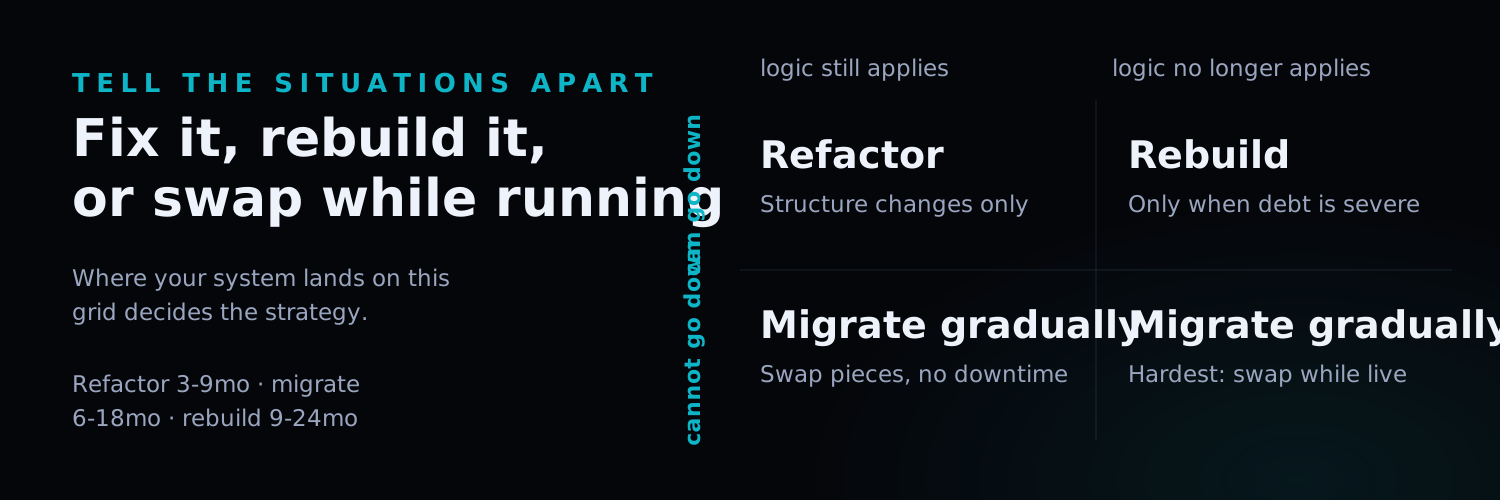
TL;DR: Legacy systems consume 60-80% of enterprise IT budgets while blocking innovation. This guide compares three modernization strategies in depth — Refactor, Rebuild, and Incremental Migration — covering use cases, cost-risk profiles, implementation steps, and a decision framework so you can choose the right path for your organization. Whether your system is “working but painful” or “barely surviving,” there is a strategy that fits.
Introduction
Is your organization paying escalating maintenance fees for a system built a decade ago, yet getting barely adequate functionality in return?
You are not alone. Gartner research shows that enterprises spend an average of 60-80% of their IT budgets on maintaining and operating existing legacy systems, leaving less than 20% for innovation (Gartner, 2024). Even more concerning, Forrester reports that 67% of organizations identify legacy systems as the single greatest barrier to digital transformation (Forrester, 2024).
But “modernization” does not mean “tear everything down and start over.” Choosing the wrong strategy can waste budgets at best, and cause business disruption at worst.
This guide breaks down three mainstream legacy system modernization strategies and provides a practical decision framework to help you make the right choice based on your system’s current state, business requirements, and available resources. If you are planning your organization’s broader digital transformation, we recommend starting with our Enterprise Digital Transformation Roadmap 2025 for the big-picture strategy, then returning here for the specifics of legacy system handling.
What Is a Legacy System? When Does It Need Modernization?
According to Gartner, enterprises spend 60-80% of their IT budgets maintaining legacy systems (Gartner, 2024). A legacy system is software built on outdated technology, architecture, or platforms that is still running but can no longer adequately meet modern business requirements or integrate with new technologies.
Seven Warning Signs Your System Needs Modernization
When your system exhibits these symptoms, it is time to seriously consider modernization:
| Warning Sign | Specific Indicators | Severity |
|---|---|---|
| Maintenance costs keep climbing | Annual maintenance exceeds 60% of IT budget | High |
| Cannot find maintenance talent | Uses obsolete languages like COBOL or VB6; talent pool is shrinking | High |
| Cannot integrate with new systems | No API interfaces; data exchange requires manual processes | High |
| Frequent security vulnerabilities | Vendor has stopped security updates; system is exposed to known exploits | Critical |
| Obvious performance bottlenecks | System slows down or crashes during peak business periods | Medium-High |
| Feature expansion is increasingly difficult | Development cycles for new requirements keep growing longer and more expensive | Medium |
| User experience is outdated | Interface looks dated; no mobile or modern browser support | Medium |
Complete Comparison of Three Modernization Strategies
Forrester estimates that 67% of enterprises cite legacy systems as the top barrier to digital transformation (Forrester, 2024). When facing a legacy system, there are three primary modernization paths. Each has distinct trade-offs, and the right choice depends on your system’s condition, business needs, and available resources. Here is a full comparison:
| Dimension | Refactor | Rebuild | Incremental Migration |
|---|---|---|---|
| Core Approach | Improve existing code structure without changing external behavior | Build an entirely new system from scratch with modern technology | Gradually replace old modules with new ones |
| Best For | Business logic is still valid; architecture needs modernizing | System is fundamentally inadequate; technical debt is overwhelming | Core system cannot go offline; continuous operation is required |
| Timeline | 3-9 months | 9-24 months | 6-18 months |
| Cost Level | Medium | High | Medium-High |
| Risk Level | Low-Medium | High | Low-Medium |
| Business Disruption | Minimal | Possible disruption during switchover | Near-zero disruption |
| Team Fit | Team familiar with the existing system | Can be an entirely new team | Needs people who understand both old and new systems |
| Outcome Quality | Improved but constrained by original architecture | Best — fully modern architecture | Progressively improved, ultimately modernized |
Refactoring Strategy: Improve Without Tearing Down
According to McKinsey, organizations that invest in systematic code refactoring reduce their ongoing maintenance costs by 25-40% within the first two years (McKinsey, 2024). Refactoring is the systematic process of improving a system’s internal code structure, architectural design, and technical implementation without changing its external behavior. Think of it as a thorough interior renovation of an older building — the exterior and functionality remain the same, but the internal structure becomes stronger and more modern.
When to Choose Refactoring
- The existing system’s business logic still meets requirements
- Primary issues are code quality, performance, or maintainability
- The business cannot tolerate extended system downtime or switchover periods
- The team has deep knowledge of the existing system
Four-Step Refactoring Process
Step 1: Code Assessment and Technical Debt Inventory
- Use static analysis tools (SonarQube, CodeClimate) to evaluate code quality
- Identify highly coupled, low-cohesion modules
- Quantify technical debt and establish a priority ranking
Step 2: Build a Testing Safety Net
- Write automated tests for critical business logic
- Establish a regression test suite to ensure refactoring does not break existing functionality
- Target: at least 70% test coverage on core business paths
Step 3: Execute Incremental Refactoring
- Start with the highest-risk or highest-debt modules
- Refactor small sections at a time; confirm all tests pass before proceeding
- Continuous integration (CI) ensures every change is validated
Step 4: Performance Optimization and Monitoring
- Establish performance baselines and track improvements before and after refactoring
- Deploy monitoring systems to detect issues in real time
- Document refactoring decisions and architectural changes; update documentation
Rebuild Strategy: The Courage to Start Fresh
The Standish Group’s CHAOS Report found that only 31% of software projects are delivered on time and on budget, with full rebuilds carrying the highest risk of overrun (Standish Group, 2024). Rebuilding means abandoning the existing system and constructing an entirely new one using a modern technology stack. This is the highest-risk strategy but also the one with the greatest potential reward — like demolishing an old building and constructing a new one on the same plot of land.
When to Choose Rebuilding
- Technical debt has accumulated to a point where refactoring cannot resolve it
- Business requirements have far exceeded the original system’s design boundaries
- The technology the system uses is completely obsolete with no available maintenance talent
- The organization is willing to invest a longer timeline and a larger budget
Modern Technology Selection Considerations
When rebuilding, technology choices will determine the new system’s viability for the next 5-10 years:
| Technology Layer | Recommended Options | Key Considerations |
|---|---|---|
| Architecture Pattern | Microservices / Modular Monolith | Business complexity, team size |
| Backend Framework | Node.js / Python / Go | Performance needs, talent availability |
| Frontend Framework | React / Next.js / Vue | UX requirements, SEO needs |
| Database | PostgreSQL / MongoDB | Data structure, query patterns |
| Deployment Platform | AWS / Azure / GCP | Budget, compliance, regional coverage |
| CI/CD | GitHub Actions / GitLab CI | Team tooling preferences, integration needs |
We helped a mid-sized e-commerce company migrate from a legacy platform to an entirely new custom-built system, achieving zero-downtime switchover, 70% faster image loading, and a 20% increase in conversion rates. The full implementation details are documented in our E-commerce Platform Migration Case Study.
Incremental Migration Strategy: The Steady Middle Path
IDC research shows that enterprises using incremental migration approaches are 2.5x more likely to complete modernization on schedule compared to big-bang replacements (IDC, 2024). Incremental migration combines the strengths of refactoring and rebuilding by progressively replacing components while keeping the system running continuously. The most well-known implementation pattern is the Strangler Fig Pattern.
What Is the Strangler Fig Pattern?
The Strangler Fig Pattern takes its name from the strangler fig in nature — a plant that grows around a host tree, eventually replacing it entirely. In software engineering, this translates to:
- Build the new system around the old one: New features are developed with modern technology
- Gradually route traffic to the new system: Use an API Gateway or reverse proxy to incrementally redirect traffic from old to new
- Progressively retire old modules: Once a new module is validated, decommission the corresponding old module
- Complete replacement: When all functionality has been migrated, the old system is fully retired
Incremental Migration Implementation Path
Step 1: Establish a Coexistence Architecture
- Deploy an API Gateway as the unified entry point
- Configure routing rules so all traffic initially still flows through the old system
- Build data synchronization mechanisms between old and new systems
Step 2: Select the First Migration Module
- Choose a module with clear boundaries and lower risk
- Develop the replacement module using the new technology stack
- Run parallel tests to verify functional parity
Step 3: Gradually Switch Traffic
- Start by routing 5-10% of traffic to the new module
- Monitor performance and error rates closely
- Once stability is confirmed, progressively increase the traffic share
Step 4: Continue Iterating
- After the first module migration, move to the next module
- Each migration builds institutional knowledge; subsequent migrations become more efficient
- Maintain basic upkeep of the old system until it is fully retired
For more on cloud migration best practices and architecture planning, see our Cloud Architecture and Software Development Partner Guide. We will also be publishing a Cloud Migration Step-by-Step Guide with more granular technical implementation details.
The Role of AI in Legacy System Modernization
AI technology is transforming how legacy system modernization is executed, making previously labor-intensive work significantly more efficient. According to Deloitte’s 2024 report, modernization projects that use AI assistance can reduce implementation timelines by 30-40% on average (Deloitte, 2024).
How AI Accelerates Modernization
| AI Application | Capability | Impact |
|---|---|---|
| Code Analysis and Comprehension | AI automatically analyzes legacy code to identify business rules and dependencies | Reduces reverse engineering time by 50-70% |
| Automated Code Translation | Translates legacy languages (e.g., COBOL) into modern languages | Accelerates migration velocity |
| Test Case Generation | AI generates test cases based on observed legacy system behavior | Increases test coverage |
| Documentation Generation | Automatically extracts business rules from code and generates documentation | Preserves tacit knowledge |
AI does not just assist with technical modernization work — it can also replace manual processes that legacy systems were designed to support. For example, Agentic AI can automate workflows that previously depended on manual operations within old systems. For more on how Agentic AI is transforming enterprise workflow automation, see Agentic AI Enterprise Workflow Automation.
Legacy System Modernization Decision Framework
Before making your final decision, work through the following checklist to evaluate your situation:
Strategy Selection Decision Checklist
System Assessment:
- Inventory the existing system’s technology stack, lines of code, and number of modules
- Quantify the scale of technical debt (using tools like SonarQube)
- Confirm whether complete system documentation and business rules documentation exists
- Assess the availability of talent that can maintain the current system
Business Assessment:
- Is the current system specifically blocking identified business initiatives?
- How large is the gap between business requirements and current system capabilities?
- What is the business impact of system downtime (calculate losses per hour/day)?
- What will the business expansion plans for the next 3-5 years demand from the system?
Resource Assessment:
- Available budget range (one-time vs. phased investment)
- Team technical capabilities and learning curves
- External partner support capacity
- Acceptable implementation time window
Strategy Determination:
- If business logic is still valid + limited budget + cannot tolerate downtime → Refactor
- If the system is fundamentally obsolete + sufficient budget + longer timeline acceptable → Rebuild
- If the core system must stay online + gradual transformation needed + low risk tolerance → Incremental Migration
Legacy System Modernization FAQ
How much does legacy system modernization typically cost?
Costs vary based on system scale and the chosen strategy. As a general benchmark, refactoring costs approximately 30-50% of what a rebuild would cost. For a mid-sized system, refactoring typically ranges from $30,000-$100,000 USD, rebuilding can require $100,000-$250,000+ USD, and incremental migration falls somewhere in between. We recommend starting with a system assessment (typically 2-4 weeks) to obtain an accurate cost estimate before making any commitments. For budget planning guidance, see our AI cost estimation guide.
How do you ensure business continuity during modernization?
Ensuring business continuity is the top priority in any modernization project. Refactoring inherently preserves external behavior, making it the lowest-risk approach. Incremental migration achieves near-zero downtime through parallel operation and gradual traffic switching. Even rebuilding, the highest-risk strategy, can minimize business impact through blue-green deployments and canary releases. The critical requirement across all strategies is a thorough rollback plan.
Can you use multiple modernization strategies simultaneously?
Not only is it possible — it is common practice. In real-world projects, organizations frequently apply different strategies to different system modules. For example, you might refactor the core transaction system (lowest risk), rebuild the outdated reporting system (best outcome), and use incremental migration for other modules. The key is having an overarching architecture vision that coordinates how the different strategies work together.
How should SMBs with limited resources get started?
SMBs should start with the most painful business bottleneck and adopt an incremental approach. Step one is engaging an experienced technology consultant for a system assessment (typically completable in 2-4 weeks) to understand the current state and modernization priorities. Then select the module with the highest ROI potential as a pilot and use MVP thinking to validate results quickly. Nxtcloud has helped numerous SMBs complete system modernization over the past 12 years.
Conclusion
Legacy system modernization is not a question of “whether” but “how.” Every year of delay means rising maintenance costs, accumulating security risks, and lost business opportunities.
The good news is that you do not need to solve everything at once. Whether you choose to refactor, rebuild, or migrate incrementally — or, like most successful projects, combine multiple strategies for different modules — the most important thing is to start today.
Nxtcloud brings over 12 years of software development experience and more than 300 successfully delivered projects, including extensive legacy system modernization engagements. From system assessment to strategy planning, from technical implementation to go-live support, we provide end-to-end professional services.
Ready to give your systems a fresh start?
- Schedule a free system assessment — our technical team will provide a professional diagnosis of your legacy systems
- Contact us — learn more about modernization solutions and success stories