
Most AI automation projects end the same way: the system ships, everyone agrees it feels faster, and nobody can say how much was saved. The problem is not the AI. It is that nobody recorded what “before” looked like. Without a baseline there is no ROI, only a feeling.
This guide covers how to baseline a process before you automate it, how to verify the result afterwards, and which costs get left out of the math.
Why most teams cannot show ROI
Three things go wrong:
- No before numbers. Measurement starts after launch, so the comparison is a memory, and memory flatters the new system.
- Measuring output instead of outcome. “300 documents a day” is not ROI. “Two people for half a day, now one person for 40 minutes” is.
- Counting savings but not costs. Rollout hours, human review, model fees, and maintenance get left out, so payback looks shorter than it is.
Step 1: build the baseline
Before automating anything, write down the current state. Pick one process. Do not try to measure a whole department.
| Item | How to get it | Example |
|---|---|---|
| Volume | System logs or a manual count over 2 to 4 weeks | 420 documents a week |
| Time per item | Time 10 to 20 real items, take the median | 6.5 minutes |
| Error rate | Share of items later corrected, disputed, or returned | 3 in 100 |
| Cost of one error | Correction time plus any external cost | 25 minutes plus freight cost |
| Labour cost | Fully loaded hourly rate, including overhead | $28 per hour |
| Turnaround | Time from arrival to completion | 5.2 hours |
Use the median, not the average. A handful of extreme cases will pull an average up and make the result look better than it is.
That last row is the one teams skip, and it is often what customers actually notice. Cutting a quote from three hours to twenty minutes can matter more to your win rate than the labour you save.
Step 2: pick a process worth automating
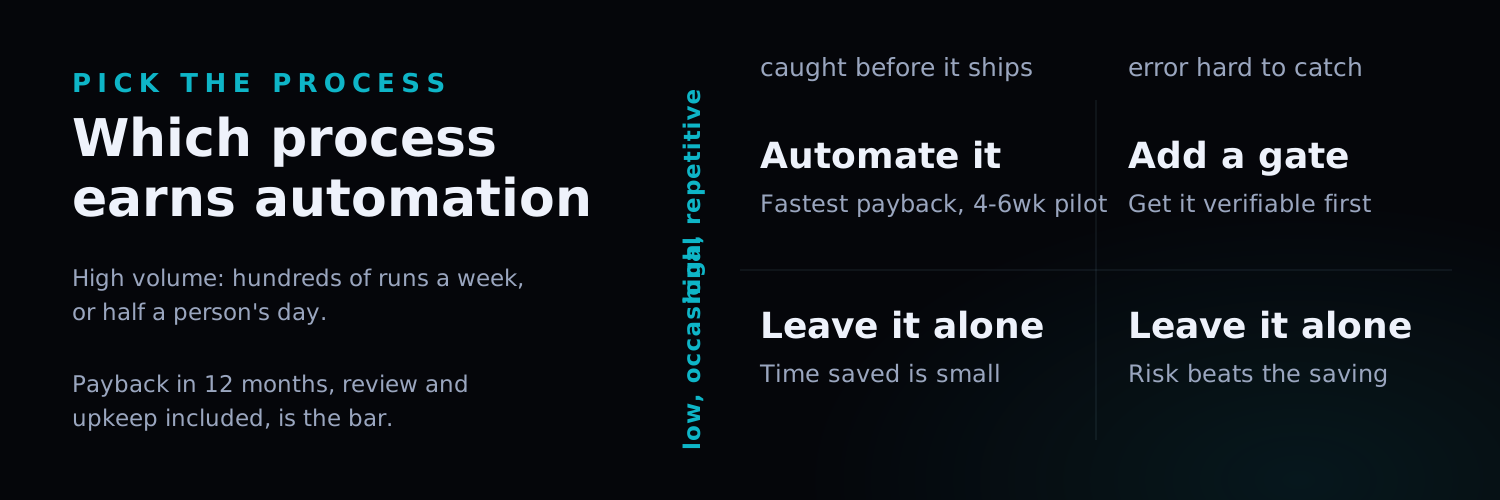
Not everything deserves it. Processes that meet all three of these pay back fastest:
- High volume and repetitive: hundreds of times a week, or half a person’s day.
- Clear rules or plenty of history: you can state the criteria, or past correct results exist.
- Errors are visible: a person sees the output before it goes out, or the system can validate it.
The opposite profile, low volume with case-by-case judgement and errors that surface late, is where AI costs more than it saves. Leave it alone.
Step 3: the ROI math
The basic formula:
Annual saving = (time saved per item × annual volume × labour cost)
              + (errors avoided × cost per error)

Annual cost   = amortised rollout + model and service fees
              + human review hours + maintenance

Payback (months) = rollout cost ÷ ((annual saving − annual running cost) ÷ 12)
Worked example (assumed numbers, substitute your own baseline):
- Time per item drops from 6.5 to 1.5 minutes, saving 5 minutes
- Annual volume 21,840 items (420 a week)
- Labour cost $28 per hour
Hours saved = 21,840 × 5 ÷ 60 = 1,820 hours, roughly $50,960. Subtract model fees, review hours, and maintenance to get the real number.
The four costs teams forget
- Human review. Automated does not mean unattended. Low-confidence results still need a person, and those hours count.
- Data preparation. Cleaning rate sheets, templates, and historical records usually takes longer than the model work.
- Exception handling. The exception rate in the first months runs higher than in steady state. Staff for it.
- Maintenance. Formats change, source systems update, models drift. Budget for it as a running cost, not a one-off.
Add those four in. If payback is still inside twelve months, the project is usually worth doing.
Step 4: pilot before you scale
Designing the pilot matters more than running it:
- Scope: one process, one document type, or one customer segment.
- Duration: four to six weeks, long enough for exceptions to appear.
- Data: real data, not a curated sample.
- Success criteria written down first, for example “time per item down 50% with under 5% manual correction”.
When the pilot ends, measure against the same baseline table. Hit the target and expand. Miss it and find out whether the problem is the process, the data, or the model, rather than abandoning the idea.
Keep measuring after launch
ROI is not a one-time number. Accuracy drifts as data and formats change, and automation without maintenance can end up slower than the manual process it replaced. Re-measure time per item and error rate at least quarterly, and keep the human review log as the input for the next round of tuning.
In one line
Measure first, automate second, verify with the same ruler. Projects that skip step one cannot show a result, no matter how good the technology is.
If you are weighing up whether a process is worth automating, we can run a workflow review and fill in that baseline table with you before anyone writes code.