
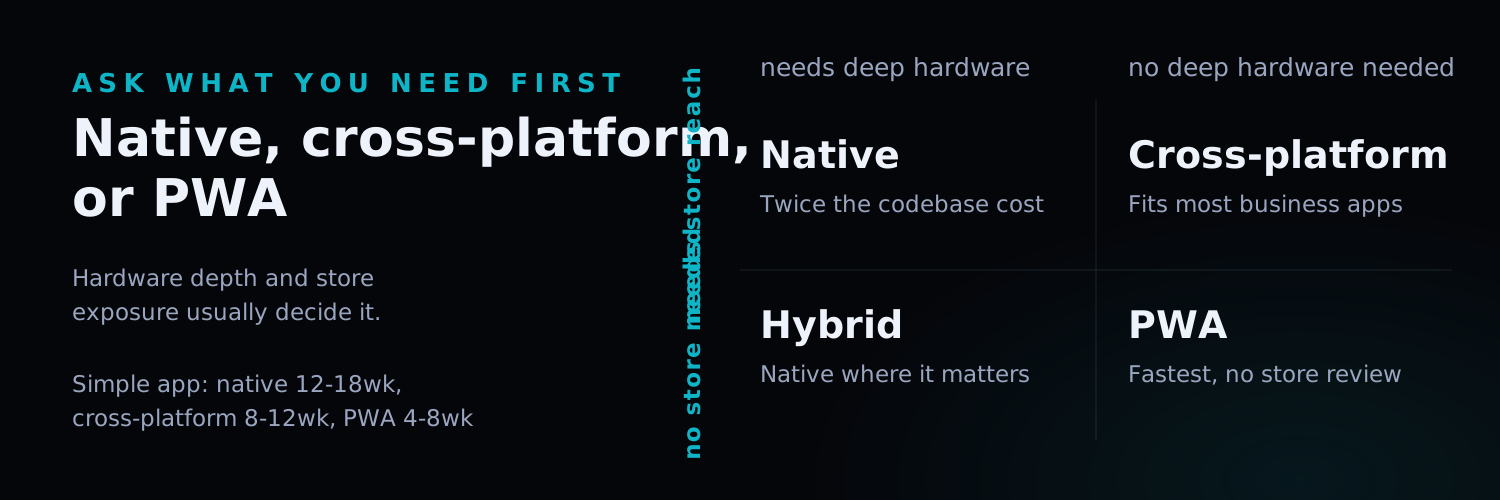
TL;DR: There is no universally “best” mobile app technology — there’s a best fit for your specific requirements, budget, and timeline. This guide compares native (Swift/Kotlin), cross-platform (React Native/Flutter), and Progressive Web Apps (PWA) across cost, performance, device access, and long-term maintenance, with a decision framework based on real project scenarios and a realistic budget range for each approach.
Introduction
“Should we build native or use React Native?” is one of the most common questions we hear from founders and product teams starting a mobile project — and it’s usually the wrong first question. The right first question is: what does this app actually need to do, for whom, and how fast do you need it in the market?
Get the platform decision wrong and the consequences compound. Choose native when you didn’t need it, and you’ve doubled your development cost and timeline maintaining two separate codebases for a straightforward business app. Choose cross-platform when you needed deep hardware integration, and you’ll spend months fighting framework limitations that native development wouldn’t have had.
This guide breaks down the real trade-offs — not the marketing claims — across the three main approaches, so you can make the decision based on your actual requirements.
The Three Approaches, Explained Plainly
Native Development
Building separately for iOS (Swift/SwiftUI) and Android (Kotlin/Jetpack Compose) — two distinct codebases, each using the platform’s own language and toolchain.
Strengths: Best possible performance, full access to every platform API and device capability on day one (camera, sensors, background processing, platform-specific UI patterns), and the smoothest possible user experience because the app is built the way the platform expects.
Trade-offs: Two codebases to build, test, and maintain means roughly 1.5-2x the development cost of a single cross-platform codebase, and every feature gets built twice.
Cross-Platform Development (React Native, Flutter)
A single codebase that compiles to both iOS and Android, sharing the majority of business logic and UI code between platforms.
Strengths: One codebase, meaningfully lower cost and faster time-to-market, and a large talent pool (particularly for React Native, given the overlap with web React development).
Trade-offs: Some platform-specific polish requires native modules or workarounds; performance is very good for the vast majority of business apps but can lag native for graphics-intensive or highly animated experiences; new OS features sometimes take longer to become available in the framework than they are natively.
Progressive Web App (PWA)
A web application built to behave like a native app — installable, works offline, sends push notifications — without going through app store distribution.
Strengths: Lowest cost, fastest to ship, no app store approval process or review delays, and one codebase serves both mobile and desktop web.
Trade-offs: Limited access to device hardware (no deep Bluetooth integration, limited camera control, restricted background processing), no App Store/Play Store presence (which matters for discovery-driven consumer apps), and iOS has historically been more restrictive about PWA capabilities than Android.
Comparison Table
| Dimension | Native | Cross-Platform | PWA |
|---|---|---|---|
| Development Cost | Highest (1.5-2x) | Medium | Lowest |
| Time to Market | Slowest | Medium | Fastest |
| Performance | Best | Very good for most apps | Good for simple UI, limited for complex interaction |
| Device Access | Full | Near-full (native modules for gaps) | Limited |
| App Store Presence | Yes | Yes | No (unless wrapped) |
| Maintenance | Two codebases | One codebase | One codebase |
| Best For | Performance-critical, hardware-heavy apps | Most business apps needing app store presence | Content apps, internal tools, rapid validation |
A Practical Decision Framework
Work through these questions in order — the first one that gives a clear answer usually determines your path.
1. Do you need deep hardware integration (Bluetooth peripherals, advanced camera/AR, background location tracking, complex sensor fusion)? → If yes, lean native, or cross-platform with native modules for the specific hardware-dependent features.
2. Is this a consumer app where app store discovery and presence matters for growth? → If yes, you need iOS/Android app store presence — PWA is off the table; choose between native and cross-platform based on the remaining questions.
3. Is this validating a business idea, or serving an internal team, where speed to first users matters more than polish? → PWA or cross-platform, in that order of preference for speed and cost.
4. Do you have budget and timeline for two separate codebases, and is the performance ceiling of cross-platform genuinely insufficient for your use case? → Native. Otherwise, cross-platform is very likely the better cost-to-outcome trade.
Budget and Timeline Benchmarks
| App Complexity | Native (iOS + Android) | Cross-Platform | PWA |
|---|---|---|---|
| Simple (content/booking, fewer than 10 screens) | 12-18 weeks, $60,000-$120,000 | 8-12 weeks, $35,000-$70,000 | 4-8 weeks, $15,000-$35,000 |
| Medium (marketplace, social, multi-role) | 20-30 weeks, $120,000-$250,000 | 14-20 weeks, $70,000-$140,000 | 8-14 weeks, $35,000-$70,000 |
| Complex (fintech, real-time collaboration, heavy hardware use) | 30-52 weeks, $250,000+ | 20-32 weeks, $140,000-$250,000 | Rarely appropriate at this complexity |
These ranges assume a defined scope and an experienced team; unclear requirements or frequent scope changes extend both timeline and cost regardless of technology choice.
Common Mistakes We See
Choosing native “to be safe” without a hardware-dependent requirement. This is the single most expensive avoidable mistake — teams pay double for a capability ceiling they never end up needing.
Choosing PWA for a growth-dependent consumer app. If your growth model depends on app store search and featured placement, a PWA cuts off a primary acquisition channel before you’ve validated the product.
Underestimating platform-specific QA. Even cross-platform apps need real device testing on both iOS and Android — emulators miss real-world issues around notch/camera cutouts, gesture navigation conflicts, and OS-version-specific bugs.
Treating the framework choice as permanent and irreversible. Starting with cross-platform and adding a native module for one hardware-heavy feature later is common and low-risk. Starting native and needing to add a second full native codebase because you chose iOS-only first is a much larger pivot.
Mobile App Development FAQ
Is React Native or Flutter better?
Both are production-proven at scale (React Native powers parts of Instagram and Shopify; Flutter powers Google Pay and BMW's app). React Native has a larger talent pool, especially useful if your team already knows React for web. Flutter tends to deliver slightly more visual consistency across platforms out of the box because it renders its own UI rather than bridging to native components. We choose based on team fit and specific feature requirements rather than a blanket preference.
Can we start with a PWA and upgrade to a native or cross-platform app later?
Yes, and it's a common validation strategy — ship a PWA to test demand and core functionality with minimal investment, then invest in a cross-platform or native app once you have real usage data justifying the bigger build. The business logic and API layer built for the PWA typically carries over to the next phase, reducing rework.
How much of the codebase is actually shared in cross-platform development?
For a well-architected React Native or Flutter app, typically 80-95% of the codebase is shared between iOS and Android, with the remainder being platform-specific native modules for features like push notification setup, deep hardware integration, or platform-specific UI details. This is significantly higher than early cross-platform frameworks achieved a decade ago.
Do app stores treat cross-platform apps differently during review?
No — Apple's App Store and Google Play review apps based on their behavior and compliance with store guidelines, not the underlying framework. A well-built React Native or Flutter app goes through the same review process as a native app and faces no inherent disadvantage.
What ongoing maintenance costs should we expect after launch?
Budget roughly 15-20% of the initial build cost annually for a cross-platform app (OS updates, dependency upgrades, bug fixes, minor feature additions), and closer to 20-25% for native given the two-codebase maintenance burden. PWAs typically run lowest at 10-15%, benefiting from web-standard tooling and no app store re-submission cycles for most updates.
Conclusion
The native-vs-cross-platform-vs-PWA decision isn’t a technology preference — it’s a direct trade-off between performance ceiling, cost, and time-to-market that should be driven by what your specific app actually needs to do. Most business apps — the majority of what gets built — don’t need the performance ceiling that justifies native’s cost premium. The apps that do need it usually know it from a specific hardware or performance requirement, not a general sense that native is “more serious.”
Nxtcloud has shipped mobile apps across all three approaches — from PWAs validating new business ideas in weeks to native apps handling demanding real-time requirements. We scope the technology to the requirement, not the other way around.
Ready to plan your mobile app?
- Talk to our team — get a technology recommendation scoped to your actual requirements
- See our Custom Software Development services — how we scope and build MVPs and full platforms