
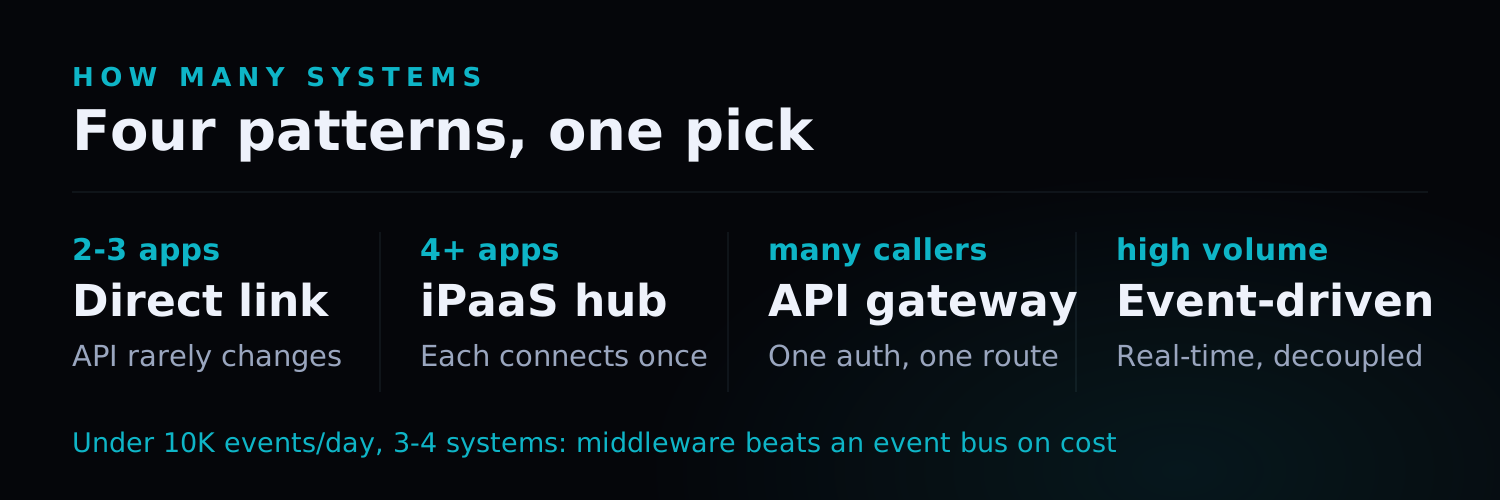
TL;DR: Most enterprises don’t have a “software problem” — they have a “systems that don’t talk to each other” problem. This guide covers the four integration architecture patterns (point-to-point, middleware/iPaaS, API gateway, and event-driven), the authentication and error-handling decisions that make or break reliability, and a 4-phase implementation process for connecting ERP, CRM, and e-commerce platforms — with real cost and timeline benchmarks.
Introduction
Ask most operations teams what eats their week, and the answer is rarely “not enough software.” It’s too much software that doesn’t talk to itself. Orders land in the e-commerce platform, get re-typed into the ERP, get re-typed again into the CRM for the sales team, and somewhere in that chain a decimal point gets dropped and nobody notices until the invoice is wrong.
MuleSoft’s 2024 Connectivity Benchmark found that the average enterprise now runs 976 individual applications, and only 29% of them are integrated (MuleSoft, 2024). The gap between those two numbers is where manual data entry, reconciliation errors, and delayed decisions live.
This guide is a practical walkthrough of how to actually connect the systems your business runs on — not a theoretical overview of “what an API is.” If you’re evaluating whether to build custom integrations or buy an integration platform, and how to avoid the failure modes that make integrations flaky, this is for you.
Why API Integration Projects Actually Fail
Before the how, the why. In our own integration work — connecting SAP, NetSuite, Dynamics, Odoo, and dozens of e-commerce and logistics platforms — the failures cluster around a small number of root causes.
| Failure Mode | Root Cause | Consequence |
|---|---|---|
| Duplicate records | No idempotency keys on write operations | Double-booked orders, duplicate invoices |
| Silent data loss | No retry queue for failed calls | Orders vanish; nobody notices until a customer complains |
| Broken on vendor updates | Point-to-point integration with no abstraction layer | Every ERP upgrade breaks three downstream systems |
| Rate-limit failures | No backoff strategy | Bulk syncs fail during peak traffic |
| Security exposure | API keys hardcoded or shared across environments | Credential leaks, unauthorized access |
Four Integration Architecture Patterns
There is no single “right” way to integrate systems — the right pattern depends on how many systems you’re connecting, how often data needs to sync, and how much you’re willing to maintain in-house.
Pattern 1: Point-to-Point Integration
Each system talks directly to each other system via custom code. Simple for two systems, but complexity grows quadratically — connect 5 systems point-to-point and you need up to 10 individual integrations to maintain.
Best for: Connecting exactly 2-3 systems with stable APIs and low change frequency.
Pattern 2: Middleware / iPaaS (Integration Platform as a Service)
A central platform (e.g., Workato, Zapier for simpler cases, or a custom middleware layer) mediates between systems. Each system connects once to the middleware instead of to every other system.
Best for: Mid-sized businesses connecting 4+ SaaS tools where a no-code/low-code platform covers the integration logic needed.
Pattern 3: API Gateway
A single entry point that all external and internal API traffic flows through, handling authentication, rate limiting, logging, and routing centrally. Common in larger organizations exposing internal systems to multiple consumers (mobile apps, partner integrations, internal tools).
Best for: Organizations with multiple internal teams or external partners consuming the same underlying systems.
Pattern 4: Event-Driven Integration
Systems publish events (e.g., “order created,” “inventory updated”) to a message bus (Kafka, AWS EventBridge, RabbitMQ), and other systems subscribe to the events relevant to them. This decouples systems completely — the ERP doesn’t need to know the CRM exists, it just publishes events.
Best for: High-volume, real-time sync requirements (e.g., e-commerce inventory across multiple channels) where near-instant consistency matters and point-to-point calls would create too much direct coupling.
Authentication: Getting the Foundation Right
Nearly every integration reliability problem traces back to how authentication was handled on day one.
| Method | Use Case | Key Risk |
|---|---|---|
| API Key | Simple server-to-server calls | Leaks easily if hardcoded; rotate regularly |
| OAuth 2.0 | Third-party platforms (e-commerce, CRM SaaS) | Token expiry must be handled with automatic refresh |
| Mutual TLS (mTLS) | High-security financial/healthcare integrations | Certificate management overhead |
| Webhook signing (HMAC) | Verifying inbound webhook authenticity | Must validate signature before processing, every time |
Non-negotiable practices:
- Store credentials in a secrets manager (AWS Secrets Manager, Doppler, or equivalent) — never in code or config files committed to version control.
- Use separate credentials per environment (dev/staging/production) so a leaked staging key can’t touch production data.
- Rotate API keys on a schedule, not just after an incident.
Error Handling and Reliability Patterns
This is the part most integration projects skip — and the part that determines whether the integration survives contact with production traffic.
Idempotency: Every write operation (create order, update inventory) should carry an idempotency key so that a retried request doesn’t create a duplicate. Most modern payment and e-commerce APIs support this natively; if your internal systems don’t, build a dedup layer using a unique transaction ID.
Retry with exponential backoff: Network calls fail. A naive integration gives up after one failed call; a resilient one retries with increasing delays (1s, 2s, 4s, 8s…) and a maximum retry count, then routes to a dead-letter queue for manual review.
Circuit breakers: If a downstream system is down, stop hammering it with requests — trip a circuit breaker that fails fast for a cooldown period, then attempts a test request before resuming normal traffic.
Reconciliation jobs: Even with all of the above, data can drift out of sync. A scheduled reconciliation job that compares record counts and checksums between systems catches silent failures before they compound.
The 4-Phase Integration Implementation Process
Phase 1: Map (1-2 weeks)
Document every system involved, every data field that needs to move between them, and where the “source of truth” lives for each piece of data (e.g., inventory count is owned by the ERP, not the e-commerce platform). This phase alone prevents most downstream rework — teams that skip it end up rebuilding data mappings mid-project when they discover a field means different things in two systems.
Phase 2: Design (1-2 weeks)
Choose the integration pattern (point-to-point, middleware, gateway, or event-driven), define the authentication approach, and design the error-handling and retry strategy before writing integration code.
Phase 3: Build (3-6 weeks, depending on system count)
Develop and test each integration against real data — not just sample payloads. Test explicitly for the failure modes: what happens when the downstream API times out, returns a malformed response, or hits a rate limit.
Phase 4: Sync & Monitor (ongoing)
Go live with monitored, alerting-enabled data sync. Set up dashboards tracking sync success rate, latency, and reconciliation drift — an integration with no monitoring is an integration you’ll find out is broken from an angry customer, not from your own systems.
Real Cost and Timeline Benchmarks
| Scope | Typical Timeline | Typical Cost (USD) |
|---|---|---|
| 2 systems, simple REST APIs, low volume | 3-5 weeks | $8,000-$20,000 |
| 3-4 systems (ERP + CRM + e-commerce) | 6-10 weeks | $20,000-$60,000 |
| 5+ systems, event-driven, high volume | 10-16 weeks | $60,000-$150,000+ |
| Legacy system with no API (needs middleware/screen-scraping bridge) | +2-4 weeks | +$15,000-$40,000 |
Costs scale less with the number of systems and more with data complexity — how many fields need transformation logic, how many edge cases exist in the business rules, and whether any of the systems predate modern API standards.
API Integration FAQ
Do we need a full iPaaS platform, or can custom integration be cheaper?
For 2-3 systems with straightforward data flows, custom point-to-point integration is often cheaper to build and just as reliable, without a recurring platform subscription. iPaaS platforms earn their cost when you're connecting 4+ systems, need non-technical staff to modify workflows, or expect to add new integrations frequently. We typically recommend starting with the simplest architecture that meets your reliability needs and upgrading only when the maintenance burden justifies it.
What happens if one of our systems (e.g., a legacy ERP) doesn't have an API?
This is common with older ERP and accounting systems. Options include: using the vendor's database directly via a secured read replica (if supported), building a middleware bridge using the system's file export/import capabilities, or in rare cases, a controlled screen-scraping layer as a last resort. We assess API availability during the mapping phase specifically to flag this risk before committing to a timeline.
How do we prevent an integration from silently breaking after a vendor updates their API?
Three practices: version-pin your API calls where the vendor supports it, subscribe to the vendor's API changelog/deprecation notices, and run automated integration tests against a staging environment on a schedule (not just at build time) so breaking changes surface within hours, not weeks.
Can integrations be built incrementally, or do all systems need to launch together?
Incremental is almost always the right approach. Start with the highest-pain data flow (commonly order data between e-commerce and ERP), validate it in production, then add the next system. This mirrors the incremental migration pattern we recommend for legacy modernization and reduces the blast radius of any single integration going wrong.
How do you handle data privacy and compliance across integrated systems?
Map which system is the authoritative source for personally identifiable information (PII) and restrict replication of sensitive fields to only the systems that genuinely need them. For regulated data (payment details, health records), encrypt in transit and at rest, and ensure every system in the chain meets the relevant compliance requirement — a chain is only as compliant as its weakest link.
Conclusion
The systems your business runs on will keep multiplying — that’s not a problem to solve once, it’s an ongoing architectural discipline. The organizations that get the most value from integration don’t try to connect everything to everything; they identify where manual re-entry actually costs time and money, and integrate those flows first, with reliability patterns (idempotency, retries, reconciliation) built in from day one rather than bolted on after the first production incident.
Nxtcloud has built and maintained integrations across SAP, Oracle NetSuite, Microsoft Dynamics, Odoo, and dozens of e-commerce and logistics platforms. If manual data entry between your systems is costing your team real hours every week, we can help you map the fastest path to a reliable fix.
Ready to connect your systems?
- Talk to our integration team — get a scoped assessment of your current data flows
- See our ERP integration services — platforms we work with and how engagements are structured